WhatsApp Rolls Out Pin Messages Feature for Individual, Group Chats

- GSM Arena


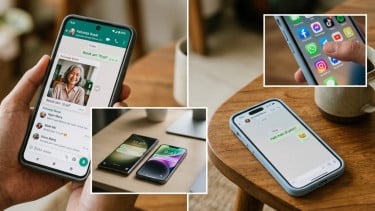
Jakarta – WhatsApp officially launched a new pin message feature. This feature allows users to pin one message at the top of a chat, mimicking the ability to pin chats in the home window. The rollout is now underway for Android, iOS, and PC users.

According to WhatsApp, pinned messages allow users to highlight significant messages in both group and individual chats.
This feature is designed to save users time by making it easier to find important messages quickly.

Whatsapp ensures that all message types, including text, polls, images, emojis, and more, can be pinned and remain end-to-end encrypted.

WhatsApp.
- Misrohatun Hasanah

The first step to pinning a message is to update the WhatsApp application. Because, if it has not been updated, the message pin menu will not appear on the user's WhatsApp.
How to pin a chat pin on WhatsApp is very easy. The steps are almost similar to when you want to delete a message. Here are the steps:
- Open WhatsApp as usual
- Enter one of the chat rooms, either group or private chat
- Specify the message you want to pin
- Press and hold the message until a menu option appears
- Click the 'More' option.
- Select the 'Embed' menu.
- There will be options for the duration of the pinned chat, namely 24 hours, 7 days, and 30 days.
After selecting the last option, you will see the pinned message appear at the top of the chat room with a pin icon on the left side. When clicked, you will automatically be directed to that chat.
Alternatively, you can also be directed to the pinned message by long-clicking on the pinned chat > open message.
Pinned messages will not last forever. The message will be pinned according to the selected duration. For example, 7 days. After that duration, the pinned message will disappear unless the user renews it.
To pin chat, users just need to repeat how to pin a message on WhatsApp in a new chat. Furthermore, the previous pinned message will disappear automatically.
It is also worth noting that every time you pin a message, the interlocutor, whether private or group chat, will know about it. WhatsApp will notify in the chat room with the caption "You pinned a message".
If you no longer need a pinned message, how do you do it? Users can unpin or unpin. This will remove the pinned message from the top of the chat. Here are the steps:
- Open the WhatsApp chat room or chat field with the pinned message you want to unpin.
- Tap and hold until the menu below appears.
- Select the 'Unpin' option.
After clicking the last button, the message will automatically disappear from the pin.

Galeri HP Penuh Gegara Foto WhatsApp? Coba Matikan Fitur Ini Tanpa Harus Menghapus Chat
Galeri HP penuh karena foto WhatsApp? Coba matikan visibilitas media dan unduh otomatis. Chat tetap tersimpan, tetapi foto dan video tak lagi memenuhi galeri.